
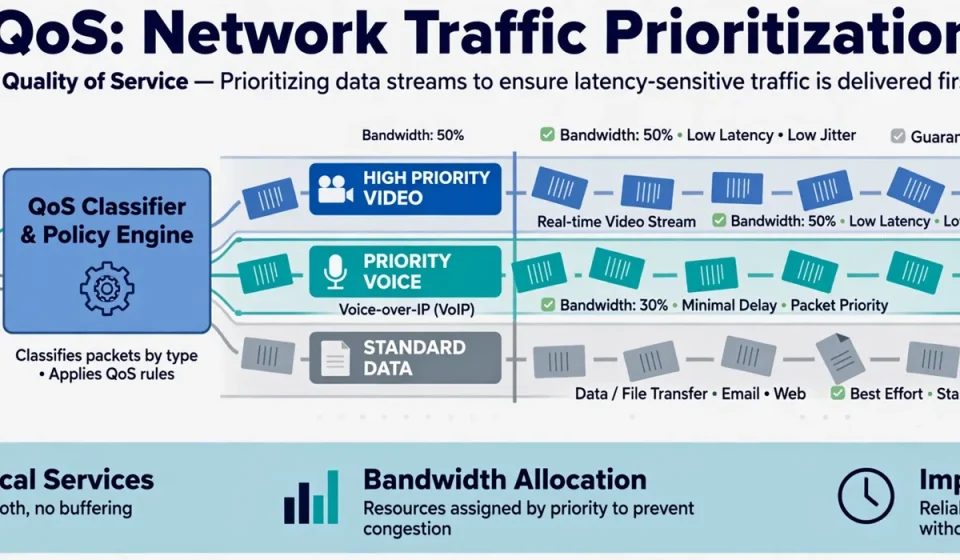

When a video call freezes, a voice call breaks up, or a cloud application stalls, the problem is rarely that the network has stopped working. More often, every kind of traffic is competing for the same limited bandwidth, and the most time-sensitive traffic loses. That is the problem quality of service is designed to solve. It does not magically create more capacity. Instead, it decides, in advance and under pressure, which traffic should go first, which can wait, and which should be limited.
What Is Quality of Service?
Quality of service, usually shortened to QoS, is a set of networking techniques that manage and prioritize traffic so critical applications perform reliably even when a network is congested. Routers, switches, firewalls, and wireless access points inspect traffic, classify it, mark it, and then treat each class differently when queues fill up. A voice packet, for example, can be sent ahead of a large file download, because a short delay ruins a conversation while it barely affects a download.
Why Quality of Service Matters
Most networks are not congested all of the time. They are congested at exactly the wrong moment: during a company-wide video meeting, a software update, a backup window, or a sudden surge in cloud use. At those moments, best-effort delivery treats all packets equally, which sounds fair but is not useful. A file transfer can tolerate a delay of several seconds. A voice call cannot tolerate a delay of even a fraction of a second without becoming unintelligible.
Quality of service matters because it protects user experience, productivity, and safety-critical communication. It reduces call drops, frozen video, lag in remote desktops, and timeouts in cloud applications. For businesses, it also protects revenue: a poor call with a customer or a failed payment session can cost far more than the network equipment that would have prevented it.
The Four Metrics That Define Quality of Service
QoS is usually judged by four related measures. Understanding them explains why simple speed tests are not enough.
Bandwidth
Bandwidth is the maximum data rate a link can carry. QoS cannot increase bandwidth, but it can reserve a share of it for priority traffic, so a backup does not consume the whole link.
Latency
Latency is the time a packet takes to travel from sender to receiver. High latency makes conversations feel delayed and interactive applications feel sluggish. QoS reduces latency for priority traffic by moving it to the front of queues.
Jitter
Jitter is variation in latency. If packets arrive unevenly, voice sounds choppy and video stutters, even if average latency looks acceptable. QoS smooths delivery by prioritizing steady, real-time streams.
Packet Loss
Packet loss happens when congested devices drop packets. A small loss rate may be invisible in email, but it causes gaps in voice, artifacts in video, and retransmissions that worsen congestion. QoS protects priority packets from being dropped first.
How QoS Works: Classification, Marking, Queuing, and Policing
QoS works in stages. First, traffic is classified by source, destination, application, protocol, or port. Voice traffic, video conferencing, and bulk data from a backup server are placed in different classes. Second, traffic is marked, often using Differentiated Services Code Point (DSCP) values in the IP header, so downstream devices can recognize its class without inspecting it again.
Third, devices queue traffic. High-priority queues are served first, while lower-priority queues wait. Some methods guarantee a minimum share to each class, so low-priority traffic is not starved completely. Fourth, traffic is shaped or policed. Shaping smooths bursts by delaying excess packets, while policing drops or remarks packets that exceed an agreed rate.
Traffic Types and Their Network Needs
Different applications fail in different ways, so they need different treatment. The table below summarizes typical needs.
| Traffic type | Priority | Latency need | Jitter sensitivity |
|---|---|---|---|
| Voice calls (VoIP) | Highest | Very low, under 150 ms one-way | Very high |
| Live video conferencing | High | Low, under 150 ms one-way | High |
| Online gaming and remote desktops | High | Low | High |
| Streaming video on demand | Medium | Moderate, buffered | Moderate |
| Business applications and web browsing | Medium | Moderate | Low |
| Backups, updates, and file transfers | Low | Can tolerate delay | Low |
Backups and updates are not unimportant. They are simply delay-tolerant, so they should yield to real-time traffic during congestion and use spare capacity at other times.
QoS Models: Best Effort, IntServ, and DiffServ
There are three main approaches. Best effort is the default on most networks: every packet is treated the same, and no guarantees are made. It works well when capacity is plentiful, but it fails under congestion. Integrated Services, or IntServ, reserves resources for each individual flow, using the Resource Reservation Protocol (RSVP). It can offer strong guarantees, but it does not scale well because every device must track every flow.
Differentiated Services, or DiffServ, is the most widely used model today. It groups traffic into classes and applies a per-hop behavior to each class. DiffServ scales because devices only need to recognize a small number of classes, not every flow. Most enterprise, service-provider, and cloud networks use DiffServ.
Where Quality of Service Is Used
QoS is used wherever real-time or business-critical traffic shares a link with bulk traffic. In offices, it protects voice and video during peak hours. In contact centers, it keeps calls clear while agents use other tools. In hospitals and factories, it protects control systems and clinical communication from being crowded out by general traffic. In homes, modern routers use simple QoS to keep video calls usable while games download updates.
In cloud and hybrid networks, QoS matters at the wide-area network edge, at VPN gateways, and on Wi-Fi, where airtime is shared. Monitoring is essential here: use SNMP to watch interface utilization and queue drops, and check connectivity and latency with netstat when troubleshooting a slow host.
The Angle Competitors Miss: QoS as a Security Control
Most guides treat quality of service as a performance feature only. That misses its security role. Security tools also need the network. Intrusion detection alerts, endpoint telemetry, log forwarding, authentication traffic, and backup data all compete with ordinary traffic. During an attack or a sudden incident, ordinary traffic can surge and crowd out the very signals defenders need to see what is happening.
A well-designed QoS policy therefore protects security telemetry as priority traffic. It ensures that logs reach a central collector, that endpoint agents can report to a console, and that incident responders can reach affected systems even when a link is saturated. It also protects recovery, so backups are not starved so badly that recovery stalls, but do not displace live security alerts either.
QoS can also be abused if it is not governed. An attacker who can mark their own traffic as high priority may gain an advantage, while a misconfigured policy can starve legitimate traffic. Treat QoS policies like firewall rules: document them, restrict who can change markings, audit them regularly, and test what happens when a class is flooded.
How to Implement Quality of Service in Five Steps
Start by measuring. Identify your most important applications, their traffic patterns, and where congestion actually occurs. Do not guess. Next, classify traffic into a small number of classes, usually no more than five or six. Then, mark traffic consistently at the edge, and trust those markings only from devices you control. Configure queuing, shaping, and policing on congested links, not on every link. Finally, monitor queue drops, latency, and jitter, and adjust. QoS is not a set-and-forget setting.
Common Mistakes and Limits of QoS
QoS cannot fix a link that is simply too small for all essential traffic, and it cannot control traffic once it leaves your network. Markings may also be ignored by an internet provider. Another common mistake is marking everything as high priority, which defeats the purpose. If every packet is urgent, none is. Keep policies simple, visible, and reviewed.
Conclusion
Quality of service is about making deliberate choices before congestion forces bad ones on you. By classifying traffic, protecting real-time and security-critical flows, and managing queues fairly, you can deliver reliable voice, video, and cloud performance on the network you already have.
Frequently Asked Questions
What is quality of service in simple terms?
Quality of service is a way for networks to prioritize important traffic, such as voice and video calls, over less urgent traffic, such as file downloads, when bandwidth is limited.
Does QoS increase internet speed?
No. QoS does not create extra bandwidth or increase your internet speed. It decides how existing bandwidth is shared, so priority traffic performs better while lower-priority traffic may wait longer.
What is the difference between DiffServ and IntServ?
IntServ reserves resources for each individual traffic flow, which offers strong guarantees but scales poorly. DiffServ groups traffic into classes and applies policies per class, which scales better and is more widely used.
Should I turn on QoS on my home router?
Yes, if your video calls or games suffer when someone else downloads large files or streams video. Enable QoS, prioritize voice and video, and test the result. If your connection is rarely congested, the effect may be small.
Can QoS help with security?
Yes. QoS can protect security telemetry, logs, authentication, and incident-response traffic during congestion or an attack, so defenders can still see and respond to events. It should be governed like other security policies.



[…] of Service (QoS). Quality of Service (QoS) lets the switch prioritize latency-sensitive traffic such as voice and video calls over downloads […]
[…] is a key part of Quality of Service (QoS). QoS is the wider set of policies, queues and mechanisms that prioritise traffic. DSCP is the label […]