
DSCP, or Differentiated Services Code Point, is a six-bit field in the IP header that marks a packet with a priority level. Network devices read that mark and treat the packet accordingly: voice and video traffic can jump the queue, while bulk downloads and backups wait. In short, DSCP is how a network tells urgent traffic from traffic that can wait.
If you have ever been on a video call that froze when someone started a large download, you have seen what happens without traffic prioritisation. DSCP, as part of Differentiated Services, or DiffServ, is one of the main tools that prevents that. This article explains what DSCP is, how it works, the main DSCP values, how it relates to Quality of Service, and how to use it safely in a business network.
What Is DSCP?
DSCP stands for Differentiated Services Code Point. It is a six-bit value in the Differentiated Services field of the IPv4 header, and in the Traffic Class field of the IPv6 header. The six bits allow 64 possible values, from 0 to 63. Each value represents a per-hop behaviour, or PHB, which is the treatment a router or switch should give to a packet at each hop along its path.
DSCP replaced the older Type of Service, or ToS, field. ToS used three bits for precedence and was rarely used consistently. DSCP is more flexible and is widely supported by routers, switches, firewalls and endpoints. It does not guarantee bandwidth or low latency by itself. It is a marking that must be honoured by every device along the path to have an effect. If one device ignores or rewrites the mark, the benefit is lost.
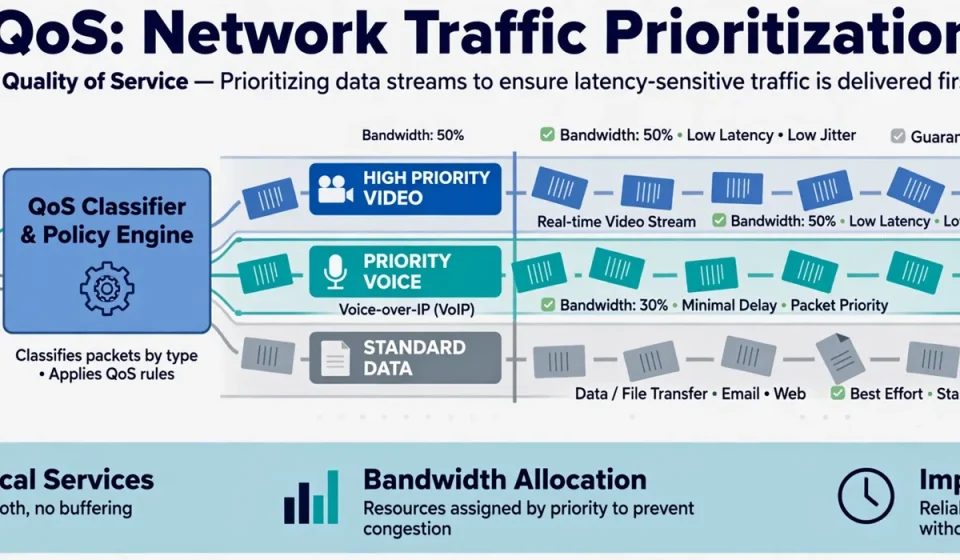
DSCP is a key part of Quality of Service (QoS). QoS is the wider set of policies, queues and mechanisms that prioritise traffic. DSCP is the label that tells QoS how to classify each packet. Without a consistent marking scheme, QoS policies are difficult to apply, especially across different vendors and networks.
How Does DSCP Work?
When a packet enters a network, it is classified and marked with a DSCP value, usually by an endpoint, a switch, or a router at the network edge. The mark stays in the IP header as the packet travels. At each hop, the router or switch reads the DSCP value, places the packet in the appropriate queue, and forwards it according to that queue’s priority, bandwidth and drop policy.
For example, a voice packet marked Expedited Forwarding, or EF, is placed in a low-latency, low-loss queue and forwarded first. A video conferencing packet marked Assured Forwarding may get a guaranteed minimum bandwidth. A bulk file transfer marked Best Effort, with DSCP 0, is forwarded only when higher-priority queues are empty. If the network is congested, Best Effort packets are the first to be dropped.
This is why DSCP matters most when a link is busy. On an empty network, every packet gets through quickly, regardless of its mark. Under congestion, DSCP decides who waits and who does not. It is not magic: if you mark everything as high priority, nothing is high priority. Effective DSCP design means marking only the traffic that truly needs priority, and keeping the rest at Best Effort or a lower class.
DSCP Values and Classes
| Class | DSCP values | Decimal | Typical use |
|---|---|---|---|
| Best Effort (BE) | 000000 | 0 | Default traffic, web browsing, email |
| Expedited Forwarding (EF) | 101110 | 46 | Voice calls, real-time audio |
| Assured Forwarding AF11-AF13 | 001010, 001100, 001110 | 10, 12, 14 | Low-priority data, bulk transfers |
| Assured Forwarding AF21-AF23 | 010010, 010100, 010110 | 18, 20, 22 | Business data, transactional traffic |
| Assured Forwarding AF31-AF33 | 011010, 011100, 011110 | 26, 28, 30 | Video, streaming, multimedia |
| Assured Forwarding AF41-AF43 | 100010, 100100, 100110 | 34, 36, 38 | Interactive video, conferencing |
| Class Selector CS1-CS7 | 001000 to 111000 | 8 to 56 | Compatibility with older IP precedence |
Assured Forwarding has four classes, AF1 to AF4, each with three drop precedences. AF41 has higher priority than AF31, and within a class, AF41 is less likely to be dropped than AF43. Expedited Forwarding is the highest priority for real-time traffic and should be used sparingly, usually only for voice, because it can starve other traffic if overused. Class Selector values match the old IP precedence values and are used for compatibility, for example CS6 for network control traffic such as routing protocols.
DSCP vs QoS vs ToS
These terms are often confused. ToS was the original eight-bit field in IPv4, with three bits for precedence. DSCP is the modern six-bit marking inside the same field, now called the Differentiated Services field. QoS is the overall system of classification, marking, queuing, policing and shaping that uses DSCP, among other methods, to deliver different levels of service.
In practice, you will see DSCP and QoS used together. A QoS policy might say: mark voice traffic as EF, video as AF41, and business applications as AF31, then configure queues to give EF strict priority, AF41 a guaranteed share of bandwidth, and Best Effort whatever is left. Without DSCP, the policy has no consistent way to identify which packets belong in which queue.
Where DSCP Is Used
DSCP is used in enterprise networks, service provider networks, and cloud and voice systems. Common uses include voice over IP, where EF marking keeps calls clear even when the network is busy; video conferencing, where AF41 marking prevents freezing; and business applications, where AF31 or AF21 marking gives critical systems priority over recreational traffic.
DSCP is also used at the WAN edge, where a branch office connects to headquarters over a limited link. By marking traffic at the branch, the WAN router can prioritise voice and critical applications over backups and software updates. In data centres, DSCP can help prioritise storage and replication traffic. In cloud environments, DSCP markings may be honoured inside a virtual private cloud, but they are often stripped or ignored on the public internet, so do not rely on DSCP end-to-end across the internet.
Security Considerations for DSCP
DSCP has security implications that are easy to overlook. Because DSCP markings are trusted by routers, an attacker who can mark their own traffic as EF can gain priority and starve legitimate traffic, a form of denial-of-service. To prevent this, mark traffic only at trusted points, such as a managed switch or router, and remark or strip DSCP values at the network edge for traffic from untrusted sources, such as guest networks or the internet.
DSCP can also leak information. The marking reveals the type of traffic, which can help an attacker identify voice, video or control traffic. On a shared network, that is a minor risk, but on a sensitive network it is worth considering. Firewalls and routers should be configured to enforce DSCP policy, not just to trust it. A network firewall can help by controlling which traffic is allowed in the first place, while QoS and DSCP control how allowed traffic is prioritised.
How to Configure DSCP in 6 Steps
1. Identify your traffic types
List the traffic that matters: voice, video conferencing, business applications, email, web browsing, backups, and recreational traffic. For each, note how sensitive it is to delay, jitter and loss.
2. Choose a marking scheme
Keep it simple. A common scheme is EF for voice, AF41 for video, AF31 for business applications, AF21 for general data, and Best Effort for everything else. Document the scheme and use it consistently across all devices.
3. Mark at the edge
Configure switches, phones, or routers at the network edge to mark traffic as it enters. Do not trust markings from endpoints you do not manage, such as guest devices.
4. Configure queues on routers and switches
Set up queues that match your markings. Give EF a low-latency queue, give AF classes a guaranteed minimum bandwidth, and leave Best Effort with the remainder. Test under load, not just when the network is idle.
5. Police and shape
Use policing to limit traffic that exceeds its allocation, and shaping to smooth bursts. This prevents one class, even a high-priority one, from consuming all available bandwidth.
6. Monitor and adjust
Monitor queue drops, latency and jitter for each class. If EF traffic is being dropped, you may have marked too much traffic as EF. If business applications are slow, you may need to increase their allocation. Review the scheme after major changes, such as a new video system or a WAN upgrade.
Common DSCP Mistakes
The most common mistake is marking everything as high priority, which defeats the purpose. The second is inconsistent marking: one site uses EF for voice, another uses AF31, and the WAN treats them differently. The third is forgetting the return path. DSCP must be applied in both directions, or a call will be clear in one direction and broken in the other. The fourth is assuming DSCP works across the internet. Most ISPs ignore or rewrite DSCP, so it is mainly useful inside your own network and on managed WAN links. Finally, do not forget to document the scheme. A marking scheme that lives only in one engineer’s head will be lost when they leave.
Frequently Asked Questions
What is DSCP?
DSCP, or Differentiated Services Code Point, is a six-bit field in the IP header that marks a packet with a priority level, so routers and switches can treat it according to its class, such as voice, video, or best-effort data.
What is DSCP 46?
DSCP 46, binary 101110, is Expedited Forwarding, or EF. It is the highest-priority class, used for real-time traffic such as voice calls, because it requires low delay, low jitter and low loss.
What is the difference between DSCP and QoS?
DSCP is a marking in the IP header that identifies a packet’s priority. QoS, or Quality of Service, is the wider system of policies, queues and mechanisms that uses DSCP and other methods to prioritise traffic on a network.
Does DSCP work on the internet?
Usually not end-to-end. DSCP works well inside an enterprise network and on managed WAN links, but most internet service providers ignore or rewrite DSCP markings, so it cannot be relied on across the public internet.
How do I check DSCP values?
Use a packet capture tool such as Wireshark to inspect the Differentiated Services field in the IP header, or use your router or switch’s QoS statistics to see how many packets are in each class and whether any are being dropped.
Conclusion
DSCP is a small field with a large effect. By marking packets with a priority level, it lets a network protect voice and video when the link is busy, give business applications the bandwidth they need, and let bulk traffic wait its turn. The key is to keep the scheme simple, mark only what truly needs priority, configure queues to match the markings, and monitor the results. Used that way, DSCP is a practical, low-cost way to improve the performance and reliability of a business network, especially for real-time applications where a frozen call or a dropped packet is immediately noticeable.