
When a network link fails, every second of delay can mean dropped calls, stalled cloud applications, and lost transactions. Routing protocols such as OSPF and BGP are reliable, but their built-in hello timers are often too slow to notice a failure quickly. That gap is exactly why BFD exists. BFD, or Bidirectional Forwarding Detection, is a lightweight protocol that lets two neighbouring devices check, many times per second, whether the path between them is still working. If the checks stop, BFD tells the routing protocol immediately, so traffic can move to a backup path in milliseconds rather than seconds.
What Is BFD?
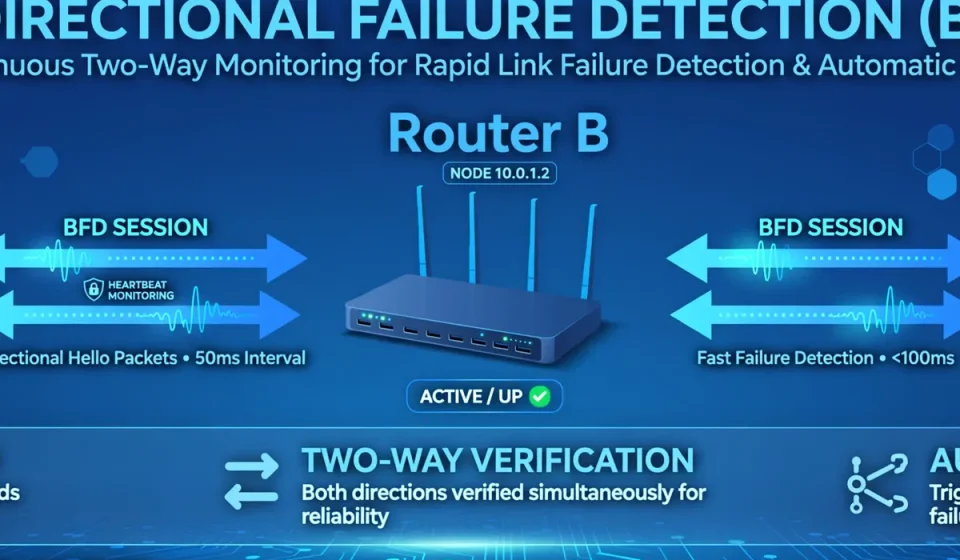
BFD is a simple, protocol-independent failure-detection mechanism defined in RFC 5880. It does not carry user traffic and it does not decide which route is best. Instead, it answers one question, continuously: is my neighbour still reachable on this path? Two devices form a BFD session and exchange small control packets at an agreed interval. As long as those packets arrive, the session stays up. When they stop arriving for a set detection time, the session is declared down, even if the physical interface still looks up. That last point matters, because many real failures are invisible to interface status alone, such as a faulty forwarding engine, a congested link, or a broken path through a switch.
How BFD Works
A BFD session begins with a three-way handshake. Each device sends control packets containing its own discriminator, a unique session identifier, and the transmit and receive intervals it proposes. Once both sides agree, the session moves to the Up state and steady-state control packets flow in both directions. Each packet also carries diagnostic information and state, so a neighbour knows whether the peer is initializing, up, or administratively down. If a device stops receiving packets within the detection time, it changes the session state to Down and notifies the client protocol, which can then withdraw routes and reconverge. Because BFD runs in the forwarding plane or close to it, it reacts far faster than a routing protocol waiting for its next hello.
BFD Session States
The main states are Down, Init, and Up. In Down, no session exists or the peer has been declared unreachable. In Init, one side has heard from the other but the handshake is not complete. In Up, both sides are exchanging packets successfully. Administrators can also set a session to AdminDown for maintenance, which stops traffic from using that path without removing the configuration.
BFD Timers and Modes
Detection time is not a single fixed value. It is calculated from three negotiated values: the transmit interval, the receive interval, and the detect multiplier. The formula is simple: detection time equals the greater of the two intervals, multiplied by the detect multiplier. A multiplier of three is common, because it tolerates a single lost packet without declaring a false failure. Shorter intervals detect failures faster, but they also increase CPU load and the risk of false positives on busy or unstable links. The table below shows typical timer profiles.
| Profile | Transmit interval | Detect multiplier | Detection time | Typical use |
|---|---|---|---|---|
| Aggressive | 50 ms | 3 | 150 ms | Data-centre links |
| Standard | 300 ms | 3 | 900 ms | Enterprise WAN |
| Conservative | 1,000 ms | 3 | 3 seconds | Internet or cloud paths |
BFD can run in asynchronous mode, where both sides send packets independently, or in demand mode, where packets are sent only when needed after the session is established. Asynchronous mode is the most widely used. BFD also supports an echo function, in which one device sends packets that the neighbour simply loops back, testing the forwarding path without involving the neighbour’s BFD software as deeply. Echo mode can reduce load, but it is not supported on every platform, so always check vendor documentation before enabling it.
BFD With OSPF and BGP
BFD is most valuable when it is tied to a routing protocol. With OSPF, BFD can detect a neighbour failure in well under a second, while OSPF’s default dead interval is typically 40 seconds. The result is much faster reconvergence and less packet loss. With BGP, the benefit is similar, especially for external BGP sessions where hold timers may be 90 or 180 seconds. BFD does not replace BGP’s path selection logic; it simply tells BGP sooner that a neighbour is gone, so BGP can switch to another path. This distinction matters when comparing BFD with other BGP tools. For example, the multi-exit discriminator (MED) influences which entry point BGP prefers, while BFD determines how quickly BGP learns that an entry point has failed. Used together, they improve both path choice and recovery speed.
A Simple BFD Configuration Example
Configuration syntax varies by vendor, but the logic is the same on most platforms: enable BFD, set the intervals and multiplier, and bind the session to the interface or routing neighbour. A simplified example looks like this:
bfd interval 300 min_rx 300 multiplier 3
interface GigabitEthernet0/0
bfd interval 300 min_rx 300 multiplier 3
router ospf 1
bfd all-interfaces
Start with conservative timers in production, verify that sessions stay stable under load, and only then shorten the intervals. Changing timers on both sides at the same time, and during a maintenance window, avoids unnecessary flapping.
Benefits and Limitations of BFD
The main benefit is speed: sub-second detection protects voice, video, and cloud workloads that cannot tolerate long outages. BFD is also lightweight, protocol-independent, and widely supported across routers, switches, and firewalls. It works over single hops, multiple hops, and, on many platforms, virtual links. Its limitations are equally important. BFD only checks the path between its two endpoints, so it cannot diagnose problems beyond them. Very aggressive timers can cause false failures on congested links, and BFD itself adds control traffic that must be accounted for on low-bandwidth connections. It is a detection tool, not a complete monitoring or security solution.
The Angle Most Guides Miss: BFD Security and False Failures
Most vendor guides present BFD as a pure performance feature, but for security-minded teams it is also a risk surface. An unauthenticated BFD session can, in theory, be attacked by forged packets that claim a neighbour is down, triggering route withdrawal and a denial of service. Even without an attacker, overly aggressive timers on a cloud or internet path can flap a session during congestion, causing the same outage BFD was meant to prevent. Treat BFD like any other control-plane protocol. Enable BFD authentication where your platform supports it, using a strong shared key and a modern digest where available. Apply control-plane policing so BFD traffic cannot overwhelm the router, restrict BFD to trusted interfaces, and log session state changes. Tune timers for the real link: use aggressive timers only on stable, low-latency links, and use conservative timers across the internet, VPNs, and cloud interconnects.
Troubleshooting BFD
When a session will not come up, check the basics first: BFD enabled on both sides, matching or compatible intervals, correct neighbour addresses, and no firewall or access list blocking UDP port 3784 for single-hop sessions or 4784 for multihop sessions. Verify that the interface is up and that the routing protocol neighbour is configured to use BFD. If sessions flap, look for CPU spikes, congestion, or timer values that are too aggressive for the path. Combine BFD state with broader visibility: SNMP polling can reveal interface errors and CPU load, while netstat output on a host can help confirm whether local sockets and connections are behaving as expected.
Frequently Asked Questions
What does BFD stand for?
BFD stands for Bidirectional Forwarding Detection. It is a protocol that detects failures in the forwarding path between two network devices, in both directions, so routing protocols can react quickly.
How fast can BFD detect a failure?
Detection time depends on the configured intervals and multiplier. With 50 ms intervals and a multiplier of three, detection takes about 150 ms. With 300 ms intervals, it takes about 900 ms. Conservative internet paths often use one-second intervals, giving about three seconds.
Does BFD replace OSPF or BGP hellos?
No. BFD does not choose routes or exchange routing information. It only reports neighbour failure quickly. OSPF and BGP still handle route calculation, policy, and path selection, but they can act on BFD notifications far sooner than on their own hello timers.
Is BFD secure?
BFD can be secured with authentication on many platforms, and it should be, especially on untrusted or shared links. Without authentication, forged packets could falsely declare a session down. Combine authentication with control-plane policing and conservative timers on unstable paths.
When should you not use aggressive BFD timers?
Avoid aggressive timers on congested, high-latency, or internet paths, and on devices with limited CPU. Packet loss or delay on such paths can cause false failures and route flapping. Start conservative, measure stability, and shorten timers only where the link proves reliable.
Conclusion
BFD is a small protocol with an outsized effect on network reliability. By detecting forwarding failures in milliseconds, it lets OSPF, BGP, and other protocols recover before users notice. Its real value, however, comes from careful deployment: sensible timers, authentication, monitoring, and an understanding of what BFD can and cannot see. Configured that way, BFD turns slow failure detection from a hidden weakness into a controlled, measurable part of your network design.