
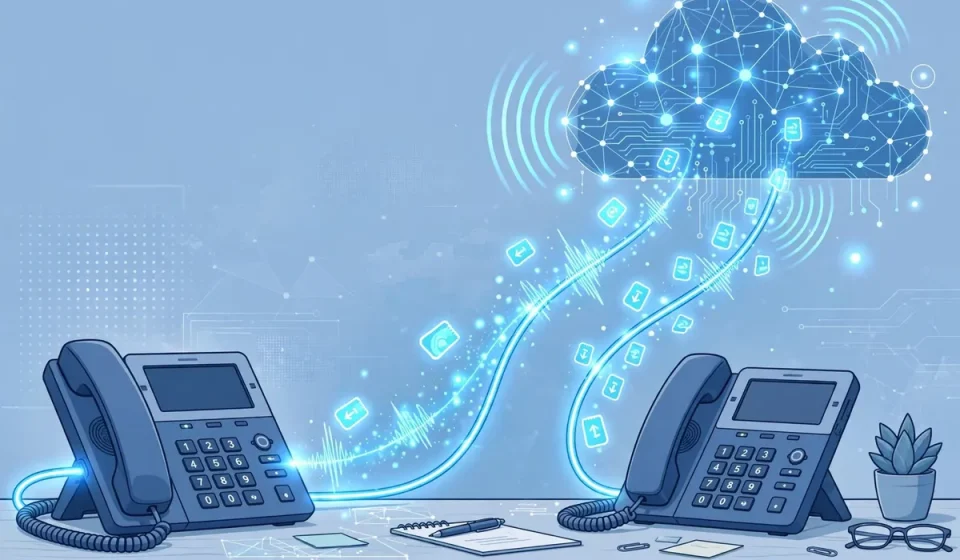

If you have ever made a call from a laptop, a smartphone app, or a desk phone plugged into a router, you have probably used voice over ip, even if you did not know its name. Voice over ip is the technology behind many modern business phone systems, remote-work tools, and cloud calling services. This guide explains the definition of voice over ip in plain language, shows how a call travels across the internet step by step, compares VoIP with a traditional phone line, and explains the security and bandwidth issues that matter most before you switch.
By the end, you will know what equipment you need, what a good connection requires, and how to protect calls from eavesdropping, fraud, and disruption. Whether you are choosing a system for a small business or simply want to understand the technology, this guide gives you a complete, practical picture.
What Is Voice Over IP?
Voice over ip, usually shortened to VoIP and also called IP telephony, is a technology that lets you make and receive voice calls over a broadband internet connection instead of a traditional analogue phone line. Rather than sending your voice as a continuous electrical signal along a dedicated copper circuit, VoIP converts speech into digital data, breaks it into packets, and sends those packets over the internet or a private network. At the other end, the packets are reassembled and converted back into sound.
That simple change has large consequences. Because calls travel as data, they can share the same connection as email, video meetings, and cloud applications. A VoIP number is not tied to a single physical line, so you can answer calls on a desk phone, a computer, or a mobile app, from the office or from home. Businesses also gain features that were once expensive or difficult on older systems, such as auto-attendants, voicemail to email, call recording, and video calling.
How Voice Over IP Works, Step by Step
Understanding the journey of a single call makes VoIP much easier to grasp. Although the details depend on the provider and equipment, most calls follow the same five steps.
- You speak into a microphone. The microphone captures your voice as an analogue sound wave, just as a traditional handset does.
- The voice is digitised and compressed. A codec converts the sound into digital data and compresses it, so it can travel efficiently without using excessive bandwidth.
- The data is split into packets. Each packet carries a small part of the call, plus addressing information that tells the network where it should go.
- Packets travel over the internet. Using signalling protocols such as SIP to set up the call and RTP to carry the audio, routers forward packets toward the recipient, often by different routes.
- The packets are reassembled and played back. The receiving device puts packets in the correct order, removes jitter and delay where possible, converts the data back into sound, and plays it through a speaker or headset.
If a packet arrives late or is lost, you may hear a brief gap or robotic sound. That is why a stable, low-latency connection matters more for voice than for ordinary web browsing, where a short delay is barely noticeable.
VoIP vs Traditional Phone: A Comparison
The table below summarises the main differences between VoIP and a traditional public switched telephone network, often called PSTN. The right choice depends on your internet reliability, budget, and need for advanced features.
| Feature | VoIP | Traditional Phone (PSTN) |
|---|---|---|
| Connection | Internet broadband | Dedicated copper phone line |
| Cost | Usually lower, especially long distance | Often higher line rental and call charges |
| Flexibility | Use anywhere with internet | Tied to a physical location |
| Features | Video, voicemail to email, auto-attendant | Basic calling, fewer built-in features |
| Power dependence | Needs power and internet | Often works during power cuts |
| Emergency calls | Location may need manual registration | Location usually tied to line address |
In short, VoIP usually wins on cost, flexibility, and features, while a traditional line can still appeal where internet service is unreliable or where a simple, power-resilient phone is the priority.
Benefits of Voice Over IP
For many homes and businesses, the appeal of VoIP is practical rather than technical. Calls, especially international calls, are often cheaper because they travel over an existing internet connection. Adding a new user usually means creating an account or connecting another handset, rather than installing a new physical line.
Mobility is another major benefit. Your number can follow you between devices and locations, which suits remote and hybrid teams. VoIP also integrates well with customer relationship tools, messaging, and video conferencing, so a phone call becomes one part of a wider communication system rather than a separate service.
Equipment You Need
You do not always need a special phone to use VoIP. A softphone, which is an app on a computer, tablet, or smartphone, works with a headset and microphone. An IP phone looks like a traditional desk phone but connects directly to a router or network switch. An analogue telephone adapter, or ATA, lets an older phone connect to a broadband router while still supporting DTMF tones for menus, voicemail, and automated systems.
Beyond the handset, you need a reliable broadband connection, a router that can prioritise voice traffic, and an account with a VoIP provider or a business phone system. Headsets, a quiet room, and a wired connection can also improve clarity, especially for long calls.
VoIP Security Risks and How to Secure It
Because VoIP calls travel over data networks, they inherit many internet security risks, and this is the angle many basic guides overlook. Attackers do not need to tap a physical wire: if voice traffic is unprotected, calls can potentially be intercepted, spoofed, or disrupted. The good news is that most risks can be reduced with sensible settings and provider choices.
Common risks
- Eavesdropping: Unencrypted calls can be intercepted on shared or compromised networks, exposing sensitive business or personal conversations.
- Spoofing and fraud: Attackers may fake caller ID or hijack accounts to make premium-rate calls, impersonate staff, or trick customers.
- Denial of service: Flooding a VoIP server or connection can degrade call quality or block calls entirely, which is serious for support lines and emergency contact points.
- Weak credentials: Default or reused passwords on phones, accounts, and admin portals are a common entry point for unauthorised access.
How to secure VoIP
- Use encryption: Choose a provider that supports TLS for signalling and SRTP for audio, so call setup and voice data are protected in transit.
- Strong authentication: Use long, unique passwords, multi-factor authentication where available, and remove unused accounts and extensions promptly.
- Keep systems updated: Update IP phones, apps, routers, and firmware regularly, and change any default administrator passwords before going live.
- Segment and monitor: Put voice traffic on a separate VLAN where possible, use a firewall, monitor unusual call patterns, and consider a site-to-site VPN for calls between offices.
Security is not a one-time setup. Review call logs, restrict international dialling if you do not need it, and train staff to verify unexpected requests, even when caller ID looks familiar.
Bandwidth, Call Quality, and Reliability
A single VoIP call typically needs only about 100 kilobits per second in each direction, including overhead, although high-quality codecs and video calls need more. The more important factors are latency, jitter, and packet loss. Aim for low latency, ideally below 150 milliseconds, minimal jitter, and packet loss well below 1 percent for clear calls.
For a small office, allow roughly 100 kilobits per second per concurrent call, plus headroom for other traffic, and use quality of service (QoS) settings to prioritise voice packets when the network is busy. A wired connection is usually more stable than Wi-Fi, and a backup internet connection can prevent a single outage from taking all phones offline.
Who Should Use VoIP?
VoIP suits remote workers, growing businesses, call centres, and anyone who makes frequent long-distance calls. It may be less suitable as the only phone service in an area with unreliable broadband, or for a location that needs a phone to work during a long power outage without backup power.
Frequently Asked Questions
What is voice over ip in simple terms?
Voice over ip is a way to make phone calls over the internet instead of a traditional phone line. Your voice is turned into digital data, sent as packets, and turned back into sound at the other end.
Do I need a special phone for VoIP?
No. You can use a computer or smartphone app, an IP desk phone, or an older phone with an analogue telephone adapter. A headset and a stable internet connection are usually enough to get started.
Is VoIP cheaper than a traditional phone line?
Often, yes, especially for long-distance and international calls, because calls use an existing broadband connection. Total cost still depends on your provider, features, equipment, and internet plan.
Is VoIP secure?
VoIP can be secure when it is set up correctly, with encrypted signalling and audio, strong passwords, updated firmware, and monitoring for unusual calls. Unencrypted services and weak credentials are the main risks to avoid.
What happens to VoIP during a power or internet outage?
VoIP needs power and an internet connection, so calls may stop during an outage unless you have backup power, mobile data, or call forwarding to another number. A traditional line may keep working in some power cuts, which is worth considering for critical locations.


[…] usually runs over internet telephony, so its security depends on the voice network. Our guide to what Voice over IP (VoIP) is explains how those calls travel and how to protect […]
[…] a broader grounding in how internet phone calls work, read our guide to Voice over IP (VoIP): definition, how it works, and how to secure it. SIP ALG sits between your phones and that VoIP service, and it is a frequent source of trouble at […]