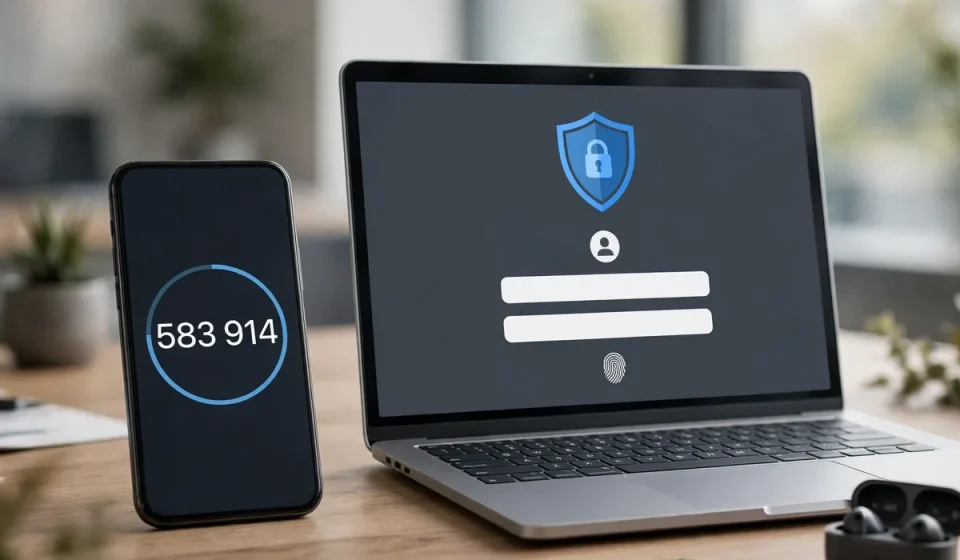

Passwords alone are no longer enough to protect accounts. They are reused, phished, guessed and leaked in data breaches at enormous scale. Multi-factor authentication, or MFA, adds a second (or third) check before access is granted, so that a stolen password alone is not enough for an attacker to get in. For most organizations, enabling MFA is the single most effective step they can take to reduce account compromise.
This guide explains what multi-factor authentication is, how it works, the main types of factors, the benefits and trade-offs, and how to roll it out without frustrating legitimate users.
What Is Multi-Factor Authentication?
Multi-factor authentication requires a user to present two or more independent categories of evidence to prove their identity. The classic categories are: something you know, such as a password or PIN; something you have, such as a phone, security key or smart card; and something you are, such as a fingerprint or facial recognition. A system that asks for a password plus a one-time code from an authenticator app is MFA, because it combines knowledge and possession. A system that asks for two passwords is not, because both factors come from the same category.
Two-factor authentication (2FA) is a form of MFA with exactly two factors. The terms are often used interchangeably, but MFA is the broader concept: it can include two, three or more factors, and modern systems may adapt the factors required based on risk, device and location.
How MFA Works in Practice
When you sign in with MFA, the process usually follows a familiar pattern. First, you enter your username and password. The system verifies them, then prompts for a second factor, for example a six-digit code from an authenticator app, a push notification to approve on your phone, a tap on a hardware security key, or a biometric check. Only when both factors are verified does the system grant access. If an attacker has your password but not your second factor, the attempt fails and you may receive an alert that someone tried to sign in.
Behind the scenes, the second factor is tied to a secret or device registered to you. Time-based one-time passwords (TOTP) are generated from a shared secret and the current time, so codes change every 30 seconds and cannot be reused later. Push approvals and security keys use cryptographic challenges that are much harder to phish than codes sent by text message. Session and device trust then determine how often you are prompted again, balancing security with convenience.
Types of MFA Factors
Something you know
Passwords, PINs and security questions fall here. They are easy to deploy but also the easiest to steal or guess, which is why they should never be the only factor for sensitive systems.
Something you have
Authenticator apps, SMS codes, email codes, hardware tokens and security keys are possession factors. Authenticator apps and hardware keys are generally stronger than SMS, because text messages can be intercepted through SIM swapping and other attacks. Hardware security keys that use standards such as FIDO2 offer the strongest phishing resistance, because they verify the site you are signing in to before they respond.
Something you are
Fingerprints, facial recognition and other biometrics are inherence factors. They are convenient because you always carry them, but they require care: biometric data must be protected, and systems should offer a fallback if a biometric check fails or is unavailable.
Context and risk factors
Adaptive MFA adds context, such as device, location, network and behavior, to decide whether extra verification is needed. A sign-in from a known device at a usual location may require only one additional factor, while a sign-in from a new country may require a stronger check or be blocked. This risk-based approach improves both security and user experience.
Comparing MFA Methods
| Method | Security | Convenience | Best For |
|---|---|---|---|
| Authenticator app (TOTP) | High | High | Most users and services |
| Push notification | High | Very high | Workforce and customer apps |
| Hardware security key (FIDO2) | Very high, phishing-resistant | Good, needs the key | Admins, high-risk accounts |
| SMS code | Moderate | High | Fallback only, not preferred |
| Biometrics | High | Very high | Devices and mobile apps |
As a rule, prefer phishing-resistant methods for privileged and high-value accounts, use authenticator apps or push approvals for everyday users, and treat SMS as a last resort rather than a default. The strongest method that users will actually adopt is better than a theoretically perfect method they work around.
Benefits of MFA
The main benefit is dramatic risk reduction. Most credential attacks, including phishing, credential stuffing and password spraying, fail when a second factor is required, because the attacker does not possess it. MFA also helps meet compliance requirements, including those in frameworks for government, healthcare and financial data, and it gives security teams better detection: failed second-factor attempts are a clear signal of attempted compromise.
MFA also supports remote and hybrid work. When users sign in from many locations and devices, a second factor provides assurance that the person signing in is the account owner, even outside the office network. Combined with single sign-on, it can even improve experience: users sign in once with strong verification and then access many applications without repeated passwords.
Challenges and How to Handle Them
MFA can fail if users lose their device, travel without coverage or are locked out by a broken authenticator. Plan recovery carefully: provide secure backup codes, a verified help-desk process and, for workforce users, temporary access procedures that do not become a bypass for attackers. Attackers increasingly target recovery and help-desk processes, so those paths need the same rigor as the main sign-in flow.
Also watch for MFA fatigue, where attackers flood a user with push approvals hoping they will approve one by mistake. Use number matching, where the user must enter a number shown on the sign-in screen, and train users to reject unexpected prompts and report them. Finally, remember that MFA protects authentication, not everything: it does not fix vulnerable applications, unpatched systems or overly broad permissions, so it should sit within a wider security program.
Rolling Out MFA Successfully
Start with the highest-risk accounts: administrators, executives, finance staff and anyone with access to sensitive data or cloud consoles. Then extend to all workforce users, and finally to customers where appropriate. Communicate early, provide simple enrollment instructions, offer more than one second-factor option, and run a pilot with a small group to find problems before a full rollout. Measure enrollment, sign-in success and support tickets, and keep executive support visible so users understand that MFA is a priority, not an optional extra.
Related requirements reinforce the same point. Government data programs, for example, often require advanced authentication for remote access, as explained in this guide to what CJIS is and its security policy. Device policies also matter when personal phones are used as authenticators, so see what bring your own device means and whether it is safe. And because MFA protects access to encrypted data and systems, it pairs naturally with strong encryption, covered in this explanation of what AES encryption is.
Frequently Asked Questions
What is multi-factor authentication?
Multi-factor authentication requires two or more independent categories of evidence, such as a password plus a code from an authenticator app, to verify identity before access is granted.
Is MFA the same as two-factor authentication?
Two-factor authentication is a type of MFA that uses exactly two factors. MFA is broader and can use two or more factors, including adaptive checks based on risk.
What is the most secure MFA method?
Hardware security keys using FIDO2 are generally the most secure and phishing-resistant, followed by authenticator apps and push approvals with number matching.
Is SMS verification safe for MFA?
SMS is better than no second factor, but it is weaker than app codes or security keys because messages can be intercepted or redirected through SIM swapping.
What happens if I lose my MFA device?
Use backup codes or your organization’s secure recovery process to regain access, then remove the lost device and register a replacement promptly to avoid leaving a stale factor active.