
Key Takeaways
- Virtual fitting rooms help shoppers compare color, silhouette, length, and styling.
- They are visual decision tools, not guarantees of exact fit or comfort.
- Clear photos and complete product images generally produce more useful previews.
- Size charts, fabric details, reviews, and return policies still matter.
- Shoppers should understand how photos and measurements are stored or used.
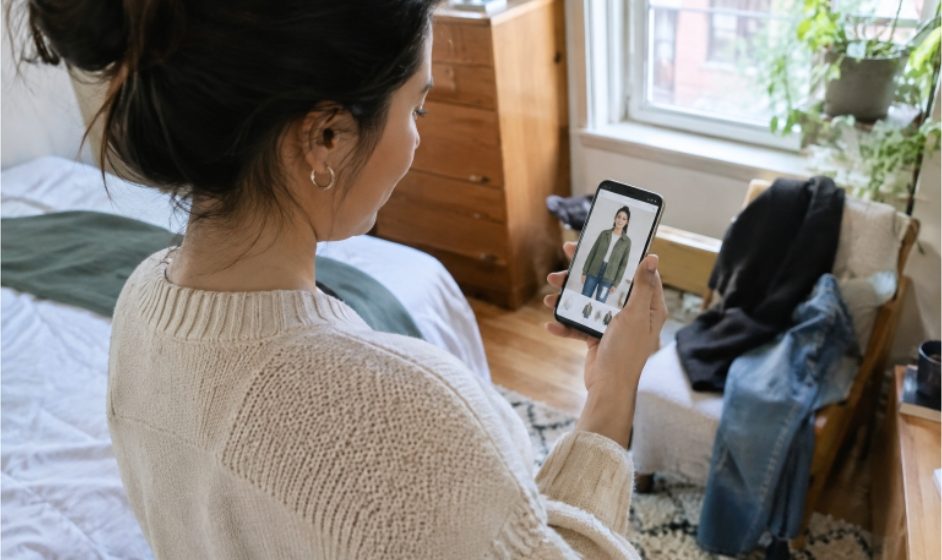
Buying clothing online is easier than ever, but deciding whether a garment will actually suit you can still feel uncertain. A virtual try on can provide a useful visual preview by placing an outfit on a photo, a digital model, or a live camera view before you order.
Why Online Clothing Choices Still Feel Uncertain
Static product photos answer only part of the question. A jacket can look polished on a studio model while leaving you unsure about sleeve length, shoulder shape, waist placement, or whether it will work with clothes already in your closet. Different poses, lighting, and model proportions can also change how the same item appears.
What a Virtual Fitting Room Actually Shows
A virtual fitting room creates a visual representation of clothing on a person, avatar, or camera view. It can help you judge whether a cropped blazer, relaxed shirt, or bold color feels right for your personal style. However, a convincing preview cannot fully show fabric weight, stretch, softness, warmth, or the precise way a garment will sit on your body.
How the Main Technologies Differ
Augmented Reality
Augmented reality, often called AR, places a digital product over a live camera image. It is especially useful for items with relatively clear placement, such as eyewear, accessories, footwear, or simple garment previews.
AI Image Generation
AI image-based tools combine a person’s photo with an image of an outfit. The system estimates body outlines, clothing edges, folds, and areas that may be hidden by arms or hair. The result can be helpful for visualizing an outfit, but it remains an interpretation rather than a photograph of a real fitting.
Body Measurement and Avatar Tools
Some services use measurements, several photos, or a profile to build a digital body model. These tools may support size recommendations, but their usefulness depends on accurate measurements and complete information about the garment’s cut, fabric, and intended ease.
Where Virtual Try-On Helps Most
Virtual fitting rooms are most useful when you need to compare silhouettes, coordinate a full look, or narrow several options before buying. They can help reveal that an oversized coat overwhelms an outfit, a color clashes with a favorite pair of trousers, or a formal outfit does not match the event you had in mind. As retail technologies continue to evolve, digital mirrors and similar tools are becoming part of the broader shopping experience.
How to Prepare Better Input Photos
- Use a well-lit photo with minimal shadows and a simple background.
- Keep your body visible from the front or at a slight angle.
- Avoid crossed arms, bulky outerwear, large bags, and poses that hide your waist or shoulders.
- Choose product images that show the full garment, including sleeves, hems, collars, and major details.
- Keep the camera level to avoid distorted proportions.
What Can Make a Result Less Reliable
Complex garments are harder to represent accurately. Flowing dresses, loose knitwear, sheer materials, shiny fabrics, dense patterns, and heavily layered outfits can create visual errors. Low-resolution images, incomplete product shots, and hidden body lines also force the tool to make more guesses. A polished image should never be treated as proof that an item will feel comfortable or fit exactly as expected.
How to Use a Virtual Preview With Other Shopping Checks
- Use the preview to assess overall shape, color, and styling.
- Check the brand’s measurement chart rather than relying only on a size label.
- Read fabric details for stretch, lining, thickness, and care requirements.
- Look for repeated customer comments about length, sizing, or quality.
- Compare the item with similar clothing you already own.
- Review the return policy before purchasing, particularly for final-sale items.
Privacy Questions Shoppers Should Ask
Photos and body-related information can be sensitive, so it is reasonable to ask whether a service stores uploads, how long it keeps them, whether data is shared with other providers, and how deletion works. The FTC’s concerns about biometric information reinforce the importance of clear disclosures, reasonable data security, and careful use of automated systems.
- Read the privacy notice before uploading a personal image.
- Use a service that explains its retention and deletion options clearly.
- Avoid sharing more personal information than the preview requires.
Accessibility and Inclusive Design
A useful virtual fitting experience should not depend on one body type, one skin tone, or one way of using a device. Clear instructions, keyboard navigation, screen-reader-friendly controls, and an option to browse without uploading a photo make the experience more practical for more shoppers. Tools should also avoid implying that a single digital image defines how clothing should look on every person.
Questions Shoppers Often Ask
Can a Virtual Fitting Room Guarantee the Right Size?
No. It can support a size decision, but garment measurements, fabric behavior, and customer feedback remain essential.
Does Virtual Try-On Work for Every Type of Clothing?
It can be useful for shirts, jackets, and simple outfits, while draped, layered, highly textured, or transparent garments may be less predictable.
Is a Camera Always Required?
No. Some tools use a live camera, while others work from uploaded photos, measurements, or preset avatars.
Can a Virtual Preview Show How Clothes Feel?
No. It cannot reliably communicate softness, breathability, weight, warmth, or physical comfort.
A Simple Five-Step Shopping Process
- Choose the item: Start with clear product photos and detailed measurements.
- Prepare the image: Select a bright, uncluttered photo with visible body lines.
- Review the preview: Focus on length, proportion, color, and outfit coordination.
- Verify the details: Check sizing, fabric, reviews, and returns.
- Make a measured choice: Buy when the visual preview and practical details point in the same direction.
What to Expect
Virtual fitting rooms will likely become more closely connected with size guidance, outfit planning, and product imagery. Accuracy may improve as product information becomes more detailed, but unusual poses, incomplete photos, and complex fabrics will remain challenging. The strongest tools will help shoppers make better decisions without pretending to replace an in-person fitting room.
Conclusion
Virtual fitting rooms can make online clothing shopping more visual and more deliberate. Use the preview to explore style and proportion, then confirm your decision with measurements, fabric details, reviews, return terms, and sensible privacy choices. That balanced approach gives a digital fitting tool its greatest value.
Related Reading: See how AI photo and video tools turn still images into motion, and explore the 7 best e-commerce platforms for developers in 2026.
Making the Most of Virtual Fitting Rooms
Finally, virtual fitting rooms work best when shoppers treat the preview as one helpful step, rather than the whole decision. For example, virtual fitting rooms can quickly show whether a length or silhouette suits you, and then the size chart can confirm the exact measurements. In addition, comparing two similar items in virtual fitting rooms often makes small differences in color and proportion much easier to spot.
Moreover, virtual fitting rooms are especially useful before a sale or a special occasion, because they help you narrow your choices calmly instead of ordering several sizes in a rush. However, shoppers should still check fabric, reviews, and returns afterwards, so that virtual fitting rooms support a confident choice rather than replacing careful checking. As a result, using virtual fitting rooms in this balanced way can lead to fewer returns and a wardrobe that feels better planned.