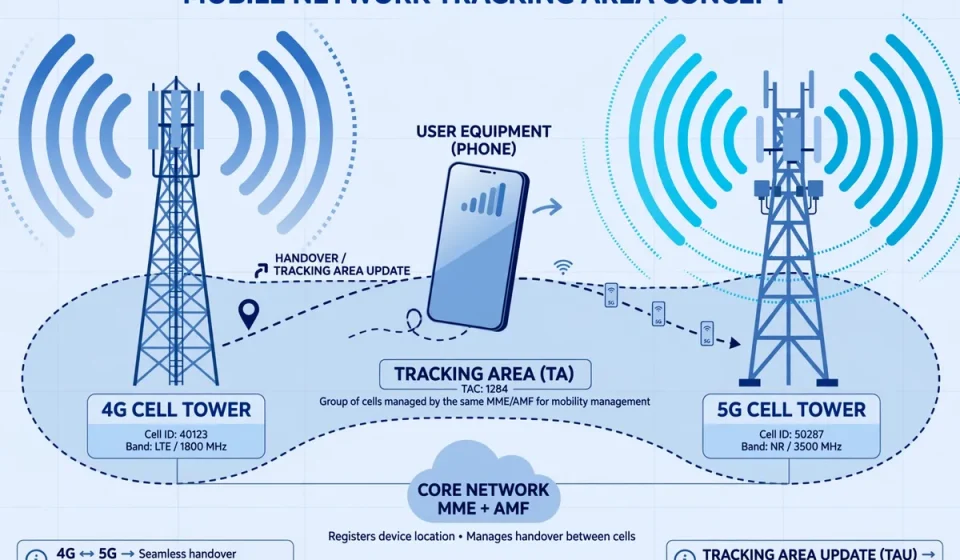

What Is a Tracking Area Update?
A tracking area update, often shortened to TAU, is the procedure a mobile phone uses to tell an LTE network where it is. When your phone moves, switches on, or checks in after a period of silence, it sends a tracking area update request to the network. The network then records the phone’s new location so calls, messages, and data can reach it without delay. Without this quiet background procedure, the network would have to search a much larger area every time someone tried to contact you, and your phone might miss incoming traffic altogether.
In LTE, the core network element that manages this process is the Mobility Management Entity, or MME. The phone, known as User Equipment or UE, does not update the network every time it changes cell. Instead, it updates only when it crosses into a new tracking area, when a timer expires, or when another specific event occurs. This balance is deliberate: frequent updates drain battery and load the network, while infrequent updates make paging slow and unreliable.
What Is a Tracking Area?
A tracking area is a logical group of cells in a mobile network. A single cell covers a small area around one base station, but a tracking area can contain many cells. Within that area, a phone can move freely without telling the network, because the network already knows it is somewhere inside the area. Each tracking area is identified by a Tracking Area Identity, or TAI, which combines a Mobile Country Code, a Mobile Network Code, and a Tracking Area Code, or TAC.
When a phone first attaches to the network, the MME gives it a list of tracking areas, called a TAI list. As long as the phone stays within a tracking area on that list, no update is needed. The moment it enters a tracking area that is not on the list, it must perform a tracking area update. This design reduces signaling while still keeping the network’s location knowledge accurate enough for paging, which is how the network alerts an idle phone to an incoming call or message.
Why a Tracking Area Update Matters
A tracking area update matters for reachability, efficiency, and battery life. First, it keeps you reachable. If the network’s record of your location is out of date, paging messages may be sent to the wrong cells and an incoming call may fail. Second, it limits paging to a sensible area. Paging every cell in a country for every call would waste radio resources; paging only the cells in your last known tracking area is far more efficient.
Third, it protects battery life. A phone in idle mode does most of its work by listening, not transmitting. By grouping cells into tracking areas, the network lets an idle phone move across several cells without waking its transmitter for an update each time. For cloud and security teams, this trade-off is familiar: like the network design explained in our guide to metropolitan area networks, grouping resources into zones reduces overhead while preserving connectivity.
Types of Tracking Area Update
Not every tracking area update has the same trigger. The main types are:
- Normal tracking area update: triggered when the phone enters a tracking area that is not in its TAI list, usually after moving to a new area.
- Periodic tracking area update: triggered by a timer, even if the phone has not moved. This confirms the phone is still switched on and reachable.
- Combined tracking area update: updates both packet-switched and circuit-switched location information, used where LTE works alongside older voice networks.
- Inter-MME tracking area update: occurs when the new tracking area is served by a different MME, so location and security context must move between core network nodes.
Step-by-Step Tracking Area Update Signaling Flow
In LTE, the signaling flow typically follows these steps:
- The phone reads the system information broadcast by a new cell and detects a TAI that is not in its TAI list.
- It sends a Tracking Area Update Request to the MME through the base station, including its old identity, the new TAI, and its capabilities.
- The MME checks the request, and if a different MME served the phone before, it retrieves the phone’s context from that MME.
- If needed, the MME authenticates the phone and updates its security keys for the new area.
- The MME updates the serving gateway and packet gateway so downlink data is routed correctly.
- The MME sends a Tracking Area Update Accept message, often with a new TAI list, a new temporary identity, and a fresh periodic timer value.
- The phone replies with a Tracking Area Update Complete message if a new identity was assigned, and then returns to idle mode.
Tracking Area Update vs Handover: A Comparison
A tracking area update and a handover both involve movement, but they solve different problems. A handover keeps an active connection alive as you move between cells, while a tracking area update keeps an idle phone reachable by updating its registered location.
| Feature | Tracking Area Update | Handover |
|---|---|---|
| Phone state | Mostly idle | Active, in a call or data session |
| Main purpose | Update registered location for paging | Keep an ongoing session connected |
| Triggered by | New tracking area, timer, or MME change | Weakening signal or better neighbouring cell |
| What moves | Location record in the MME | Radio connection to a new cell |
| User impact if it fails | Missed calls and delayed messages | Dropped call or interrupted data session |
The Extra Angle: Tracking Area Update in 5G vs LTE
Competitors often stop at LTE, but the concept changes in important ways in 5G, and this is where many explanations fall short. In 5G, the equivalent procedure is called a Registration Update, and the tracking area becomes a Registration Area. The Access and Mobility Management Function, or AMF, replaces the MME, and the network can configure a list of tracking areas for a phone in a more flexible way, including areas tailored to slices, services, or mobility patterns.
5G also separates mobility management more cleanly from session management. A phone can update its registration without disturbing an active data session in the same way, and the network can page more precisely using smaller or smarter registration areas. For operators, this means less paging load in dense cities and better support for devices that move in predictable patterns, such as delivery vehicles, sensors, and connected cars.
The security angle also changes. Because location updates carry identity and routing information, they must be protected against interception and spoofing. Attackers who can fake location signaling could misdirect paging, track movement, or disrupt service. That risk connects directly to identity deception techniques covered in our article on spoofing in cyber security, where a forged identity can undermine trust in a system that assumes the sender is genuine.
Tracking Area Updates, Battery Life, and Paging
Battery life and paging are two sides of the same design choice. A large tracking area means fewer updates and longer battery life, but paging must then be sent across many cells, which costs network resources. A small tracking area means paging is cheap and precise, but the phone must update more often, which costs battery and signaling capacity.
Security and Cloud Implications
For cloud and security teams, a tracking area update is a reminder that location is sensitive data. Tracking area identities, timers, and paging patterns can reveal movement, routines, and device presence if they are exposed or logged carelessly. Networks therefore authenticate updates, encrypt signaling where possible, and limit how widely location information is shared between nodes.
The same discipline applies to cloud services. Just as a phone should only disclose its location to a trusted core network, a cloud workload should only expose the data and endpoints it needs. Regular checks for misconfiguration and exposure are part of that discipline, which is why routine assessments such as vulnerability scanning matter alongside network design: both reduce the chance that a small, routine procedure becomes an entry point for a larger problem.
Frequently Asked Questions
What is a tracking area update in simple terms?
It is a short message your phone sends to the mobile network to say, “I have moved to a new area, please update where to find me.” This keeps calls and messages reachable without the network searching everywhere.
What triggers a tracking area update?
The main triggers are entering a tracking area that is not on your phone’s registered list, expiry of the periodic update timer, switching on after being off, and moving to an area served by a different core network node.
Is a tracking area update the same as a handover?
No. A handover moves an active call or data session to a new cell without dropping it. A tracking area update, by contrast, updates the location record of a mostly idle phone so the network can page it later.
Does a tracking area update use mobile data or drain battery?
It uses a very small amount of signaling, not your normal mobile data allowance in the way browsing does. It does use some battery, which is why networks group cells into tracking areas and use periodic timers to avoid updating too often.
How is a tracking area update different in 5G?
In 5G, the procedure is called a Registration Update, the MME is replaced by the AMF, and the network uses Registration Areas instead of LTE tracking area lists. The goal is the same — keeping the phone reachable — but the signaling is more flexible and better suited to dense networks and connected devices.