
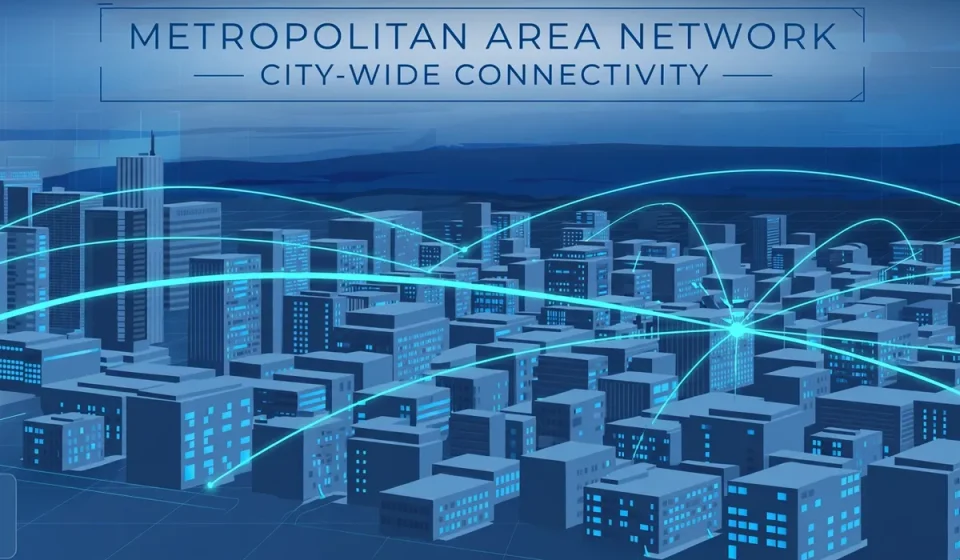

A metropolitan area network connects offices, campuses, hospitals, and data centers across a single city or metropolitan region. It is larger than the network inside one building, but smaller and more focused than a network spanning countries. For many organizations, a metropolitan area network is the missing middle: fast enough for daily work, wide enough to join sites across town, and practical enough to run without building a global network.
This guide explains what a metropolitan area network is, how it works, where it is used, and what it costs in speed, control, and risk. It also covers a point most general guides skip: how to secure a network that crosses public streets, shared infrastructure, and multiple sites.
What Is a Metropolitan Area Network?
A metropolitan area network, often shortened to MAN, is a computer network that covers a city or a large metropolitan area. It typically spans from about 5 to 50 kilometers, although some city networks reach further. A MAN links local area networks, or LANs, in different buildings so they can share resources, applications, and internet access as if they were part of one larger system.
Think of a university with campuses in different parts of a city, a hospital group with clinics and a central laboratory, or a city council with offices, libraries, and depots. Each site has its own LAN. A metropolitan area network joins those LANs together, so staff can reach the same files and services from any site, without relying on the public internet for every request.
Unlike a wide area network, or WAN, a MAN is not designed to connect distant cities or countries. Its strength is local scale: high capacity over a contained area, with lower delay than a long-distance connection. That balance makes it a natural choice for organizations that operate across a city but do not need a national backbone of their own.
How Does a Metropolitan Area Network Work?
A metropolitan area network usually runs over high-capacity fiber-optic cables laid around a city. Those cables often form a ring, so traffic can travel in either direction around the loop. If one part of the ring fails, traffic can be rerouted the other way, which improves resilience. Switches and routers at each site connect the local LAN to the city network and direct traffic to the right destination.
Several technologies can carry MAN traffic. Metro Ethernet is one of the most common. It extends familiar Ethernet networking across a city, often at speeds of 1 Gbps, 10 Gbps, or higher. Multiprotocol Label Switching, or MPLS, is another option. It labels packets so providers can prioritize important traffic, such as voice calls or video, and keep it on efficient paths.
Some MANs also use fixed wireless links to reach sites where laying fiber is slow or expensive. Wireless links suit temporary sites or difficult terrain, but they are more sensitive to weather and interference than fiber. Many city networks therefore combine fiber for the core ring with wireless or leased links for individual branches.
Ownership varies. A large organization may own its fiber outright. More often, a telecom provider, a city authority, or a consortium owns the core infrastructure and sells capacity to customers. In that model, the customer pays for a managed service rather than maintaining cables. The trade-off is less direct control over the physical network, which is why service agreements, monitoring, and encryption matter so much.
LAN vs MAN vs WAN: Key Differences
The table below summarizes how the three main network types compare. Size is the clearest difference, but ownership and typical speed matter just as much when choosing a design.
| Feature | LAN | MAN | WAN |
|---|---|---|---|
| Typical size | One building or campus, up to about 1 km | One city or metropolitan area, about 5 to 50 km | Regions, countries, or worldwide |
| Typical speed | Very high, often 1 to 10 Gbps | High, often 1 to 100 Gbps on fiber | Varies widely by link and provider |
| Ownership | Usually owned by one organization | Owned by an organization, provider, or consortium | Usually run by multiple providers |
| Examples | Office, school, or home network | City hospital group, university campuses, municipal network | Internet, multinational corporate network |
Examples of Metropolitan Area Networks
City governments use MANs to connect offices, emergency services, traffic systems, and public buildings. A single network can carry administrative data, public Wi-Fi backhaul, and camera or sensor traffic, with different levels of priority for each service.
Universities are another classic example. A university may have a main campus, a medical school, student housing, and research facilities spread across a city. A MAN lets students and researchers use the same library systems, learning platforms, and research data from any location, and it supports large transfers between laboratories and data centers.
Healthcare provides a third example. Hospitals, clinics, imaging centers, and laboratories in one city need to share patient records, scans, and test results quickly and securely. A MAN gives them a fast, city-wide link that is more predictable than sending large imaging files over the public internet.
Advantages and Disadvantages of a MAN
Advantages
- High speed across a city: Fiber-based MANs support fast transfers, video conferencing, and cloud access from every connected site.
- Shared resources: Sites can share servers, storage, and applications instead of duplicating them at each location.
- Lower delay than a WAN: Shorter distances usually mean lower latency, which helps voice, video, and real-time applications.
- Central management: IT teams can manage users, updates, and security policies from one place, rather than treating each site as an island.
Disadvantages
- Higher cost than a LAN: Leasing fiber and maintaining city-wide equipment costs more than a single-site network.
- Shared risk: A fault, outage, or security incident on shared infrastructure can affect several sites at once.
- Less control with managed services: When a provider owns the core network, customers depend on its maintenance and incident response.
- Complex planning: Adding a new site means checking fiber routes, capacity, permits, and service agreements, not just plugging in a cable.
The Angle Most Guides Miss: Securing a Shared City Network
Most explanations of a metropolitan area network stop at speed and size. For a security-conscious organization, the more important question is trust. A MAN crosses streets, buildings, and infrastructure that the organization does not fully control. Traffic may travel through a provider’s equipment, shared ducts, or a municipal network alongside other tenants. That shared path is convenient, but it must be treated as untrusted by default.
Encryption is the first control. Sensitive traffic between sites should be encrypted in transit, even when it stays inside the city network, so interception on a shared link does not expose readable data. Network segmentation is the second control. Finance, healthcare, operational systems, and guest Wi-Fi should sit in separate segments, with strict rules about which segments can talk to each other.
Access control and monitoring complete the picture. Each site should authenticate devices and users before they reach shared services, and central logging should record unusual traffic between sites and changes to network devices. Organizations should also agree in writing who patches provider equipment and how quickly outages are reported. Finally, test the backup path: a fiber ring is resilient only if failover actually works, and replicated data should stay current, using efficient methods such as change block tracking for backups between sites where that approach fits.
MAN vs Alternatives: When Should You Choose One?
A MAN is not always the right answer. A small business with one office needs only a LAN and a good internet connection. An organization with sites in different countries needs a WAN, a virtual private network, or software-defined WAN technology to manage long-distance links. A MAN fits best when sites are clustered in one city, need high and predictable performance, and share applications every day.
Before committing, compare the total cost of a MAN with leased lines, a managed SD-WAN service, and secure internet-based access. Check the provider’s service-level agreement for uptime, latency, repair times, and security responsibilities. The cheapest city link is rarely the best choice if it has no redundancy, no encryption support, and no clear incident process.
In short, a metropolitan area network is a practical, high-speed bridge between a LAN and a WAN. It gives city-wide organizations shared access, central control, and strong performance, provided they plan for cost, resilience, and security from the start.
Frequently Asked Questions
What is a metropolitan area network in simple terms?
A metropolitan area network is a network that connects computers and offices across a city or metropolitan area. It is bigger than a single building network and smaller than a national or global network.
What is the difference between a MAN and a WAN?
A MAN covers one city or metropolitan area, usually up to about 50 kilometers, while a WAN covers much larger distances, such as regions or countries.
What technologies are used in a metropolitan area network?
Common MAN technologies include fiber-optic rings, Metro Ethernet, and MPLS. Fixed wireless links are also used where fiber is difficult or expensive to install.
What are examples of a metropolitan area network?
Examples include a university connecting campuses across a city, a hospital group linking clinics and laboratories, a city government network, and a bank connecting branches in one metropolitan area.
Is a metropolitan area network secure?
A MAN can be secure, but it should not be trusted by default, especially when infrastructure is shared. Encryption, network segmentation, strong access controls, monitoring, and a clear provider agreement are essential to protect traffic between sites.


[…] handles the short links. It also carries traffic between metropolitan networks — see our guide to what a metropolitan area network is for how those city-wide networks are […]