
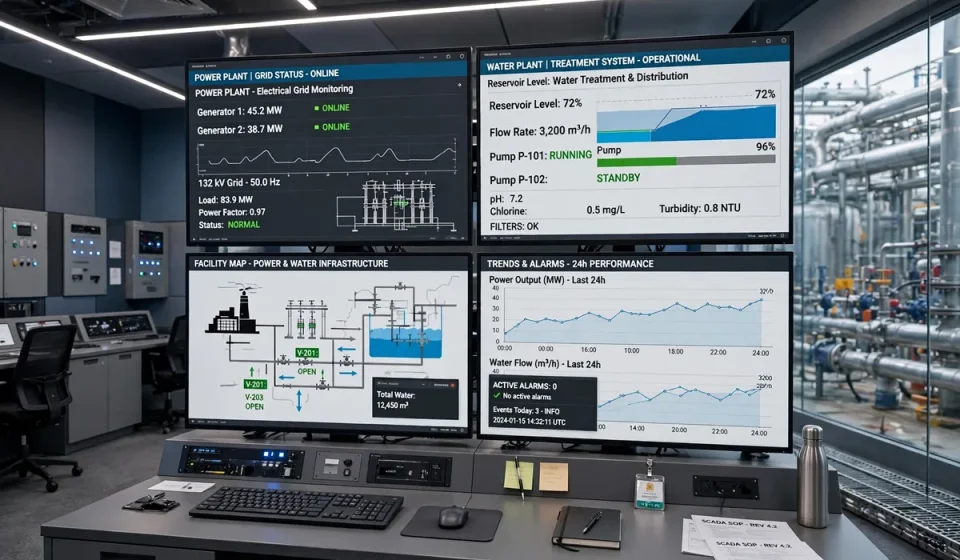

If you have searched for scada meaning, you have probably seen the term in discussions about factories, power plants, water systems, and smart infrastructure. SCADA stands for Supervisory Control and Data Acquisition. In simple terms, it is a system that lets operators monitor equipment, collect data from machines spread over a large area, and control that equipment from a central location, often without travelling to each site.
This guide explains SCADA in plain language: what it is, how it works, what its main parts do, where it is used, and how it differs from related systems such as PLC and DCS. It also covers the security angle that many general guides skip, because a system that can open a valve or stop a pump from miles away must be protected as carefully as it is operated.
What is SCADA?
SCADA is a supervisory system for industrial processes. It does not usually replace local controllers. Instead, it sits above them, giving people a clear view of the whole operation and a way to intervene when needed. Sensors measure things such as temperature, pressure, flow, voltage, and tank level. Field devices send those readings to a central system. Operators see the readings on screens, receive alarms when values move outside safe limits, and can send commands back to the field, for example to start a pump, open a valve, or change a setpoint.
The word supervisory matters. A SCADA system supervises rather than doing every fast, local control task itself. Local controllers handle split-second decisions, while SCADA provides monitoring, coordination, history, alarms, and reporting across many sites. That division keeps the process responsive even if the central connection is slow or briefly unavailable, and it lets one small team oversee a network that would otherwise need staff at every location.
How SCADA works
A typical SCADA loop follows four steps, repeated continuously while the process runs.
- Measure. Sensors and meters at pumps, pipelines, substations, and production lines collect real-time data.
- Transmit. Remote units gather the data and send it to a central server using wired networks, radio, cellular links, or a mix of these.
- Display and analyse. The central system stores the data, draws it on operator screens, compares it with limits, and raises alarms for faults, leaks, or unusual trends.
- Control. Operators, or automated rules approved by operators, send commands back through the same path to adjust equipment.
Main SCADA components and their roles
Different vendors use different names, but most SCADA systems contain the same core parts. Each part has a distinct job, and a weakness in any one of them can affect the whole system.
| Component | Role in a SCADA system |
|---|---|
| Human-Machine Interface (HMI) | The screens operators use to view diagrams, readings, alarms, and trends, and to issue commands. |
| Supervisory computer and server | Collects, stores, and processes data, runs alarms and reports, and coordinates communication with the field. |
| Remote Terminal Unit (RTU) | A field device that gathers sensor data, sends it to the centre, and carries out commands at remote sites. |
| Programmable Logic Controller (PLC) | A rugged controller that runs local logic, such as starting a motor when a level reaches a setpoint. |
| Sensors and actuators | Sensors measure the process, while actuators, such as valves and motors, change it when commanded. |
| Communication network | Links field devices to the centre using protocols such as Modbus, DNP3, or OPC, over wired or wireless links. |
| Historian database | Stores time-stamped process data for trends, audits, fault investigation, and long-term planning. |
Where SCADA is used
SCADA is used wherever equipment is spread out, the process runs continuously, or a failure would be costly or dangerous. In electric utilities, it monitors substations, feeders, and generation, helping operators balance load and restore supply after faults. In water and wastewater systems, it tracks reservoir levels, pump stations, pressure, and treatment stages across a whole city or region.
In manufacturing, SCADA oversees production lines, ovens, conveyors, and packaging, giving managers a live view of output, downtime, and quality. Oil and gas operators use it for pipelines, wells, and terminals, where sites may be remote and hazardous to visit. It also appears in transport, building management, mining, and agriculture, anywhere a central team must understand and control a physical process without being beside every machine.
Cloud-based SCADA has extended these uses. Engineers can check a plant from a control centre or a secure remote connection. That convenience helps small, multi-site teams, but network design, authentication, and monitoring around SCADA need the same care as any cloud service.
SCADA vs PLC vs DCS
People often confuse these three terms because they work together in real plants. A PLC is a controller: it runs a specific local task, such as controlling one machine or one stage of a process, and it reacts quickly. SCADA is a supervisory system: it monitors and controls many PLCs and RTUs across a wide area, but it does not replace their local logic.
A Distributed Control System, or DCS, is different again. It is designed for a single, complex plant, such as a refinery or chemical works, where many control loops must work closely together in real time. A DCS is usually tightly integrated and process-focused, while SCADA is usually geographically spread and supervision-focused. In practice, a site may use all three: PLCs for local control, a DCS for a complex unit, and SCADA for site-wide supervision and remote sites.
The security angle most SCADA guides miss
Most introductions to the scada meaning stop at definition and components. The more important question for security readers is what happens when SCADA is exposed. Many systems were designed when control networks were isolated and protocols had little authentication. Some are still in service, now connected to corporate networks and cloud dashboards, so segmentation, inventory, and monitoring are essential.
Start with inventory. You cannot protect a controller, sensor gateway, or remote site you do not know exists. A disciplined approach to IT asset management should include operational technology assets, with owners, locations, firmware versions, and network connections recorded. Next, look for unknown or unauthorised devices on control and corporate networks, because an unrecorded device can be both a blind spot and an entry point; guidance on rogue system detection is directly relevant here. Finally, use consistent, repeatable checks rather than one-off reviews, in the spirit of SCAP for IT systems, while respecting that operational technology often cannot be scanned or patched in the same way as office IT.
Practical protections include keeping control networks segmented from office and internet-facing networks, allowing only approved remote access with strong authentication, changing default credentials, disabling unused services and ports, logging SCADA commands and alarms, and testing backups and recovery before an incident. Patching needs a plan too: test updates in a safe environment, schedule them around production, and have a rollback step. Above all, treat any change to a SCADA system as a safety change as well as an IT change, because a wrong command can affect people, equipment, and the environment, not just data.
A short SCADA security checklist
- List every SCADA asset, controller, and remote connection, and name an owner for each.
- Segment control networks and restrict traffic between control, corporate, and internet zones.
- Require strong, individual authentication for remote access and remove shared accounts.
- Monitor logs and alarms for unusual commands, failed logins, and new devices.
- Keep tested backups and a written recovery plan for the supervisory server and historian.
Choosing and learning more about SCADA
When comparing SCADA options, focus first on the process you must supervise: how many sites, how fast data must update, what happens if the link fails, and which protocols your PLCs and RTUs already speak. Then consider scalability, alarm design, historian capacity, and access controls.
Frequently asked questions
What does SCADA stand for?
SCADA stands for Supervisory Control and Data Acquisition. It is a system for monitoring industrial processes, collecting data from remote equipment, and sending control commands from a central location.
What is the scada meaning in simple terms?
In simple terms, SCADA meaning is remote supervision for physical processes. Sensors report what is happening, a central system shows it to operators, and operators can adjust equipment without visiting every site.
What is the difference between SCADA and PLC?
A PLC controls a local machine or process step directly and quickly. SCADA supervises many PLCs and RTUs across a wider area, providing monitoring, alarms, history, and central control, but it does not replace local PLC logic.
Where is SCADA used?
SCADA is used in power generation and distribution, water and wastewater, oil and gas, manufacturing, transport, mining, and building management, especially where sites are remote, processes run continuously, or failures would be expensive or unsafe.
Is SCADA secure?
SCADA can be secured, but it is not secure by default. Older protocols and isolated designs were not built for modern network threats, so operators should segment networks, control remote access, keep an accurate asset inventory, monitor for unusual activity, and test recovery plans.
Conclusion
SCADA meaning is best understood as supervision at scale: sensors measure, remote units report, a central system displays and stores, and operators respond. When that loop is designed well and protected properly, one team can run a safe, efficient operation across many sites. When it is left unsegmented, unmonitored, or undocumented, the same connectivity becomes a risk. Understanding both sides is the starting point for using SCADA well.


[…] guide to SCADA: what it is and how it works explains the control systems at the heart of most OT environments, and our guide to SCADA meaning […]