
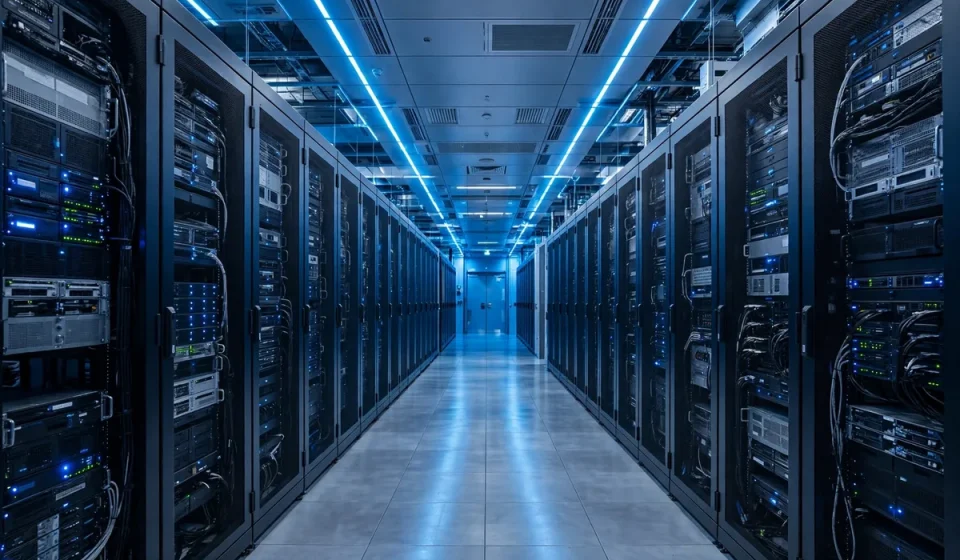

Every search, video stream, bank transaction and cloud application you use depends on a building most people never see: a data center. But what are data centers, exactly, and why do they matter so much for security, reliability and performance? In simple terms, a data center is a dedicated facility that houses computer systems, storage, networking equipment and the power, cooling and security systems needed to keep them running around the clock.
Data centers are the physical foundation of the cloud. When you save a file to cloud storage, run a business application online or stream a show, your request is processed in a data center, often hundreds or thousands of miles away. Understanding how these facilities work helps you judge providers, protect data and design systems that stay available even when something goes wrong.
What Is a Data Center?
A data center is a secure, purpose-built environment for IT equipment. Inside, rows of racks hold servers, storage arrays and network switches, all connected by high-speed cabling. Unlike an office server room, a data center is engineered for continuous operation: redundant power feeds, backup generators, precision cooling, fire suppression, physical access controls and 24-hour monitoring are standard, not optional extras.
The scale varies enormously. A small enterprise data center may occupy a single room and support one company. A hyperscale data center, operated by a major cloud provider, can cover hundreds of thousands of square feet, house tens of thousands of servers and consume as much electricity as a small city. Both share the same goal: keep systems secure, cool, powered and connected at all times.
For security teams, the data center is also a trust boundary. Physical security, network segmentation, encryption and strict access policies work together to protect the hardware and the data it holds. That is why choosing a facility, or a cloud provider that runs one, is a security decision as much as an infrastructure decision.
Types of Data Centers
Not all data centers serve the same purpose. The right type depends on control, cost, compliance and how quickly you need to scale.
Enterprise Data Centers
Enterprise data centers are built and operated by a single organization for its own use. They offer maximum control over hardware, security and compliance, but they also carry the full cost of building, staffing and maintaining the facility. They suit large organizations with strict regulatory needs or highly specialized workloads.
Colocation Data Centers
In a colocation facility, many customers rent space, power, cooling and connectivity while owning their own servers. This model avoids the capital cost of building a facility while still giving customers control over their equipment. Colocation is popular with companies that need reliable infrastructure in multiple regions without becoming facility operators themselves.
Hyperscale and Cloud Data Centers
Hyperscale data centers support cloud computing at massive scale. Providers such as Amazon Web Services, Microsoft Azure and Google Cloud run fleets of these facilities worldwide, allowing customers to rent computing power on demand instead of buying hardware. If you use cloud services, your workloads almost certainly run in hyperscale facilities, even if you never visit one.
Edge Data Centers
Edge data centers are smaller facilities placed close to users, for example in a city or at a telecom site. By processing data nearer to where it is created, they reduce latency for video, gaming, industrial sensors and real-time applications. Edge sites often work together with larger central facilities rather than replacing them.
Key Components of a Data Center
Several systems must work together for a data center to function reliably. A failure in any one of them can take services offline, so redundancy is built into each layer.
Servers and storage. Servers run applications and process requests, while storage systems hold databases, files and backups. Virtualization allows many virtual servers to run on one physical machine, improving efficiency and flexibility.
Networking. Switches, routers, load balancers and firewalls move traffic between servers, storage and the internet. High-speed, redundant network paths prevent a single cable or device failure from isolating a rack or an entire hall.
Power. Data centers draw power from the grid and protect it with uninterruptible power supplies (UPS) and diesel generators. If grid power fails, batteries bridge the gap until generators start, keeping systems running without interruption.
Cooling. Servers generate enormous heat. Precision air conditioning, hot-aisle and cold-aisle layouts, and increasingly liquid cooling remove that heat and keep equipment within safe temperatures. Efficient cooling is also one of the largest operating costs and a major sustainability concern.
Physical and logical security. Fences, cameras, biometric access, mantraps and security staff protect the building, while firewalls, encryption and access controls protect the systems inside. Regular audits and compliance certifications provide evidence that these controls actually work.
Data Center Tiers Explained
The Uptime Institute tier system classifies data centers by redundancy and expected availability. Tier I offers basic capacity with no redundancy, while Tier IV offers fully fault-tolerant infrastructure with multiple independent power and cooling paths. Higher tiers cost more but reduce the risk and duration of outages.
| Tier | Redundancy | Expected Uptime | Best For |
|---|---|---|---|
| Tier I | Basic, no redundancy | 99.671% | Small, non-critical workloads |
| Tier II | Partial redundancy | 99.741% | Small businesses with modest needs |
| Tier III | N+1 redundancy, concurrently maintainable | 99.982% | Most business and cloud workloads |
| Tier IV | 2N or 2(N+1), fault tolerant | 99.995% | Mission-critical, regulated services |
Uptime percentages sound similar, but the difference matters: 99.671% allows about 28.8 hours of downtime per year, while 99.995% allows only about 26 minutes. When you evaluate a provider, ask which tier its facilities meet and what the service-level agreement actually guarantees.
How Data Centers Work Day to Day
Inside a working data center, operations follow a disciplined routine. Monitoring systems track temperature, humidity, power draw, network traffic and server health in real time. Automated alerts flag anomalies before they become outages, and on-site engineers respond around the clock.
Workloads are distributed for resilience. Critical applications run across multiple servers, racks or even facilities, so one failure does not stop the service. Backups are taken regularly and stored separately, and disaster-recovery plans are tested so that operations can move to another site if a facility is damaged or loses power for an extended period.
Security operations are equally continuous. Access is granted on a least-privilege basis, visitors are escorted, and changes to equipment or configurations are logged and approved. For organizations handling sensitive data, these controls are not just good practice; they are often required by regulations and customer contracts.
Data Centers, Cloud Security and Your Business
Even if you never run your own facility, data center choices affect your security posture. A provider with strong physical security, redundant power and cooling, and clear compliance reporting reduces your risk. At the same time, you remain responsible for how you configure cloud services, manage identities and protect data in transit and at rest. The shared responsibility model means the provider secures the facility and the underlying infrastructure, while you secure your applications and data on top of it.
For practical guidance on applying these principles in a smaller organization, see this guide to cloud security for small business. Network controls inside and around the facility also matter: a clear explanation of what a network firewall does will help you understand one of the key protections between your systems and the internet. And if you are weighing private infrastructure against public cloud options, read about private cloud security risks and best practices before you decide.
When evaluating any provider, ask about certifications such as SOC 2 or ISO 27001, the location of your data, backup and recovery testing, incident response procedures and how quickly the provider will notify you of a security event. Clear, documented answers are a good sign; vague assurances are not.
Choosing a Data Center or Cloud Provider
Start with your requirements: uptime, latency, compliance, data residency and budget. A Tier III facility in the right region may be ideal for most workloads, while a Tier IV facility may be justified for financial, healthcare or emergency services. Consider connectivity options, scalability, energy efficiency and the provider’s track record during real incidents, not just its marketing claims.
Also plan for exit and portability. Can you move workloads or retrieve data if you change providers? Are there fees or technical barriers that lock you in? A good strategy avoids single points of failure, whether that is one facility, one provider or one network path.
Frequently Asked Questions
What are data centers used for?
Data centers host servers, storage and networking equipment that run websites, cloud applications, databases, email, streaming and business systems, keeping them available and secure around the clock.
What is the difference between a data center and the cloud?
A data center is a physical facility, while the cloud is a service model that rents computing resources from data centers over the internet, so you can use capacity without owning the building or hardware.
How secure are data centers?
Reputable data centers use layered physical security, network controls, encryption, monitoring and audits, but overall security also depends on how customers configure and manage their own systems and access.
What causes data center outages?
Common causes include power failures, cooling problems, network faults, hardware failures, software errors and human mistakes, which is why redundancy, monitoring and tested recovery plans are essential.
Do I need my own data center?
Most organizations do not. Colocation or cloud services usually offer better reliability and lower cost, while a private facility only makes sense at very large scale or under strict control and compliance requirements.


-
-
-
-
-
-
Show Comments[…] context on the infrastructure these tools protect and accelerate, see this overview of what data centers are and how they work. Network controls around accelerated applications are covered in this explanation of what a network […]
[…] on the wider infrastructure. For the facilities that house core routers, see this overview of what data centers are and how they work. Perimeter controls that protect those networks are explained in this guide to what a network […]
[…] the infrastructure these appliances protect, see this overview of what data centers are and how they work. Perimeter concepts that apply to virtual and physical firewalls alike are explained in this guide […]
[…] wider infrastructure decisions. For the facilities that host central servers, see this overview of what data centers are and how they work. Virtualized security for those environments is covered in this guide to the security virtual […]
[…] for them. Infrastructure choices also affect assessment outcomes, as explained in this overview of what data centers are and how they work. And for smaller organizations building the same discipline, this guide to cloud security for small […]
[…] IDF is a small data center in miniature. Our guide to what data centers are explains the larger facilities that an IDF ultimately connects […]