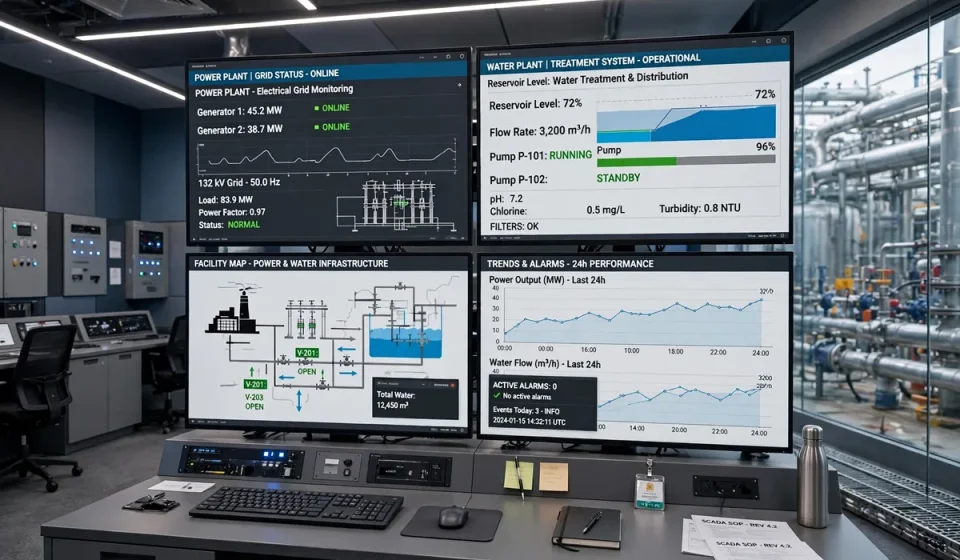

SCADA meaning: SCADA stands for Supervisory Control and Data Acquisition. It is a system of hardware and software that monitors, controls and analyses industrial processes in real time. In plain terms, SCADA lets operators in a control room see what is happening across a power grid, water plant, pipeline or factory, and change settings, open valves or shut down equipment from a central screen, instead of walking to every machine.
If a pump overheats, a tank level rises too high or a power line trips, SCADA is usually the system that raises the alarm, logs the event and lets an operator respond in seconds. This guide explains what SCADA means, how it works, its main components, where it is used, how it differs from PLC and DCS systems, and how to secure it, with real incidents that show why SCADA security matters.
What Does SCADA Mean? Breaking Down the Name
Each word in the name describes a job the system does. Supervisory means the system supervises a process from above, giving operators a high-level view and the ability to send commands. Control means it can change how equipment behaves, for example by starting a motor, adjusting a valve or changing a temperature setpoint. Data acquisition means it constantly collects live data, such as temperature, pressure, voltage, flow rate and speed, from sensors across the site.
SCADA is not one product. It is an architecture that combines sensors, controllers, communication networks, servers and human-machine interface (HMI) software. Vendors such as Siemens, Schneider Electric, Rockwell Automation, Inductive Automation and ABB all sell SCADA platforms, and many organisations build their SCADA system from components from several suppliers. What matters is the result: one coherent view of a physical process, with control and history in one place.
How Does SCADA Work?
A SCADA system works in a continuous loop. Sensors measure the physical world and send readings to remote terminal units (RTUs) or programmable logic controllers (PLCs). Those controllers pass the data over a communication network to a central SCADA server, often called the master terminal unit (MTU). The server stores the data in a historian database, checks it against alarm limits, and displays it on operator screens. When an operator, or an automated rule, decides action is needed, a command travels back down the same path to the equipment.
That loop runs constantly, often many times per second for critical measurements. A water treatment plant, for example, may monitor chlorine levels, pump pressure and tank levels every few seconds, raise an alarm if a value leaves its safe range, and record every reading so engineers can review trends, prove compliance and investigate incidents later. Modern SCADA systems also connect to business systems, so production data can feed maintenance planning, energy reporting and management dashboards.
The Main Components of a SCADA System
| Component | What it does | Example |
|---|---|---|
| Field devices | Measure and act on the physical process | Sensors, valves, motors, pumps |
| RTUs | Collect sensor data and execute commands remotely | A unit at a remote pumping station |
| PLCs | Run local control logic in real time | Controlling a production line sequence |
| Communication network | Carries data between field and control room | Radio, fibre, Ethernet, cellular |
| SCADA server / MTU | Central processing, alarming and storage | The master server in the control room |
| Historian | Stores time-series data for analysis | Years of temperature and pressure records |
| HMI | The screens operators watch and use | A mimic diagram of a plant with live values |
Many SCADA systems follow the Purdue model, which separates the system into levels: Level 0 is the physical process, Level 1 is intelligent devices such as sensors and actuators, Level 2 is supervisory control including the HMI, Level 3 is operations management, and Levels 4 and 5 are business systems and the internet. Security controls, including firewalls and data diodes, sit between the levels so that a problem in the office network does not spread directly to the plant floor.
Where Is SCADA Used? Real Examples
SCADA is used wherever a physical process must be monitored and controlled over a wide area. Electric utilities use SCADA to monitor substations, balance load and restore power after faults. Water and wastewater utilities use it to control pumping, treatment and distribution. Oil and gas companies use it along pipelines, at refineries and on offshore platforms. Manufacturers use it to supervise production lines, and transport operators use it for traffic signals, rail systems and airport baggage handling.
Smaller examples are just as real. A building management system that controls heating, ventilation and air conditioning across a campus is a SCADA-like system. A wind farm uses SCADA to monitor each turbine, adjust blade pitch and report power output. The common thread is distance and scale: too many devices, spread too far apart, for people to watch by hand.
SCADA vs PLC vs DCS vs HMI
These terms are often confused, because they overlap. A PLC is a rugged industrial computer that runs local control logic, such as starting a conveyor when a sensor detects a part. An HMI is the screen an operator uses to see and control a process. A DCS, or distributed control system, is a closely integrated system used mainly in continuous processes such as chemical plants, where control is distributed across many controllers. SCADA sits above them all, supervising a wide area and gathering data from many PLCs, RTUs and other systems.
| System | Scope | Main job |
|---|---|---|
| PLC | One machine or line | Fast local control logic |
| HMI | One operator station | Display and manual control |
| DCS | One plant, continuous process | Integrated plant-wide control |
| SCADA | Wide area, many sites | Supervision, data and remote control |
In practice, a SCADA system usually contains PLCs and HMIs. The PLC does the fast, local work, the HMI shows it to the operator, and SCADA connects many such islands into one supervised system with central alarming, history and reporting.
Why SCADA Security Matters: Real Incidents
SCADA systems were originally built for isolated networks, with little thought to cyber attack. Many still run old operating systems, use protocols without authentication or encryption, and stay in service for decades. That history makes them attractive targets, and three incidents show the consequences.
In 2010, the Stuxnet worm targeted industrial control systems and damaged centrifuges at a nuclear facility in Iran, proving that malware could cause physical destruction. In December 2015, attackers used phishing and remote access to open breakers in Ukraine, cutting power to hundreds of thousands of people and disabling the control systems that could have restored it quickly. In 2021, an attacker at the Oldsmar water treatment plant in Florida briefly raised the level of sodium hydroxide in the water supply through a remote access tool; an operator spotted the change and reversed it before anyone was harmed.
These incidents share a pattern: attackers reached the control network through IT systems, remote access or stolen credentials, then used legitimate control features to cause harm. The fix is therefore not only patching, but also controlling who can reach the control network at all.
How to Secure a SCADA System
Securing SCADA starts with visibility and separation. Inventory every device, connection and remote access path, then segment the control network from the corporate network and the internet, using firewalls and, where possible, one-way data diodes for outgoing data. Remove direct internet access for control systems, require multi-factor authentication for remote access, and keep a strict list of who can change setpoints.
Patching needs care in industrial environments, where an untested update can stop a process. Test patches offline, schedule maintenance windows, and prioritise vulnerabilities in industrial systems that are exposed or have public exploit code. Monitor control network traffic for unusual commands and new devices, using network intrusion detection systems tuned for industrial protocols. Map the threats you face to the MITRE ATT&CK framework, including its ICS matrix, so defences cover the techniques attackers actually use against industrial systems.
Finally, practise the response. Back up SCADA configurations and historian data, test restoring them, and run tabletop exercises for a control-system incident, including how to run the plant manually if the SCADA system must be isolated. Standards such as IEC 62443 and the NIST Cybersecurity Framework give a structure for this work, and regulators in energy, water and other critical sectors increasingly require it.
Benefits and Challenges of SCADA
The benefits are clear: real-time visibility, faster response to faults, fewer staff needed on site, better data for decisions, and lower operating costs. A single operator can supervise a network that would otherwise need dozens of people at remote sites. The challenges are also clear: legacy equipment that cannot be patched, protocols designed without security, long equipment lifespans, and the risk that connecting SCADA to business networks for convenience also connects it to attackers. The organisations that get SCADA right treat it as critical infrastructure, not as just another IT system, and fund its security accordingly.
Frequently Asked Questions
What is the full form of SCADA?
SCADA stands for Supervisory Control and Data Acquisition. It is a system that supervises industrial processes, controls equipment remotely, and collects live data from sensors.
What is SCADA used for?
SCADA is used to monitor and control industrial processes such as power generation and distribution, water treatment, oil and gas pipelines, manufacturing and transport systems, usually from a central control room.
What is the difference between SCADA and PLC?
A PLC is a local controller that runs control logic for one machine or process. SCADA is a wider supervisory system that gathers data from many PLCs and other devices, displays it centrally and lets operators control them remotely.
Is SCADA still used today?
Yes. SCADA remains essential in energy, water, manufacturing and transport, and is evolving with cloud dashboards, better analytics and stronger security, rather than being replaced.
What are the main security risks of SCADA?
The main risks are exposure to the internet, weak or shared passwords, unpatched legacy systems, insecure industrial protocols, and remote access that is not properly controlled or monitored.
Conclusion
SCADA meaning is simple to state and important to understand: Supervisory Control and Data Acquisition is the system that lets people see, control and record industrial processes from one place. It keeps the lights on, the water flowing and factories running, which is exactly why it must be secured as carefully as it is operated. Understand its components, know where it is exposed, segment it, monitor it and practise the response, and SCADA will remain an asset rather than a liability.